Another SharePoint Developer/Debugging Tips List

If you can only follow a single SharePoint developer blog, it should probably be Andrew Connell (even if hitting Enter in his Search box still doesn’t work in Firefox). If for some reason you haven’t already, make sure you’ve read his excellent SharePoint developer tips and tricks and SharePoint Debugging and Logging Tips and Tricks. Here are a few additional tips from comments there and elsewhere:

Debugger.Launch()

AC suggests System.Diagnostics.Trace.Assert(false) to force the debugger; System.Diagnostics.Debugger.Launch() is a more explicit alternative (featured on Corey’s .NET Tip of the Day).

Debugging GAC’d Assemblies

AC says “you’ll need to put the debugging symbols in the same location as the assembly.” While a few of the comments hint that for them it “just works” without that step, that’s probably due to a setting in their environment: Just My Code debugging is likely off. Vincent Rothwell’s Debugging Tips for SharePoint mentions this setting in passing and it has since been highlighted here and here as well.

Attaching to w3wp

Debugging doesn’t work if you aren’t attached to the right IIS worker process. One option is to use the Debugger Feature from the CodePlex Features project, which adds a new menu item to the Site Actions menu that attaches the debugger. If you would rather not install a feature, Doug Perkes suggests adding a VS External Tool to list the PIDs:

  • Title: Get IIS PIDs
  • Command: cscript.exe
  • Arguments: %systemroot%\system32\iisapp.vbs
  • Check “Use Output Window”

More External Tools

Speaking of which, Scot Hillier has put together a CodePlex project to support his development process. The installation includes several useful External Tools and more than a dozen developer-focused STSADM extensions. My favorites are enumpools and recyclepool; much more SharePointy than iisapp.vbs /r /a. Or for a GUI try Spence Harbar‘s Application Pool Recycle Utility for SharePoint Developers. For even more STSADM extensions (and some great SP object model code in general), check out Gary Lapointe’s blog.

Opening WSPs

Some developers prefer to make a copy of their WSPs with a .CAB extension as part of their development process, but if you don’t mind modifying the registry Waldek Mastykarz has a nice post on browsing .wsp files using Windows Explorer. Or if WinRAR is your tool of choice, a .reg with the following will do the trick:

Windows Registry Editor Version 5.00

[HKEY_CLASSES_ROOT\.wsp]
@="WinRAR"

Easy Access to 12 and VirtualDirectories

Waldek also posted about getting quickly to the VirtualDirectories folder in Explorer View. Many developers use a 12 Hive Toolbar; I use the same technique for VirtualDirectories. As for opening in Explorer View, why not make that the default Folder action? Here’s another .reg that does just that:

Windows Registry Editor Version 5.00

[HKEY_CLASSES_ROOT\Folder\shell]
@="explore"

Managing CAML

If I don’t stop myself now I’ll end up with a comprehensive list of every cool SharePoint thing I’ve seen in the last year. So I’ll leave you with Katrien’s list instead.

Update 7/12/2008: Added U2U CAML Query Builder.

VSeWSS: At Least It Knows CAML

Scot Hillier just posted an excellent answer to the question “Is VSeWSS 1.2 Ready for Prime Time?” In the comments, Microsoft’s Chris Johnson follows up with the assertion that the extensions cover 99% of what a developer might need. I would put that number a bit lower, but more important is the first impression given by the tools.

As the logical first tool for new developers, the extensions will undoubtedly play a formative role in how that developer thinks about SharePoint development. Scot highlights one such problem in the provided project templates: two of the four (plus empty) are Site Definitions. To a new developer, this implies that Site Definitions are probably really important, when in fact you (probably) don’t need them.

Another fundamental shortcoming of the extensions is the black box method of solution creation. Managing DDF files and manifest.xml can certainly be tedious, but there comes a time when every developer needs to tweak something in the solution definition. Scot’s example is the forced inclusion of an assembly; a quick glance at the Solution Schema reveals several others (SafeControls and CAS in particular). This is a huge blind spot in a new developer’s understanding of how SharePoint really works.

Update: A bit more research reveals that you can indeed add SafeControls (example by Chris Johnson) and CAS to the manifest.xml in WSP View. Better examples might be RootFiles or Resources, which don’t seem to have anywhere to go in a VSeWSS project.

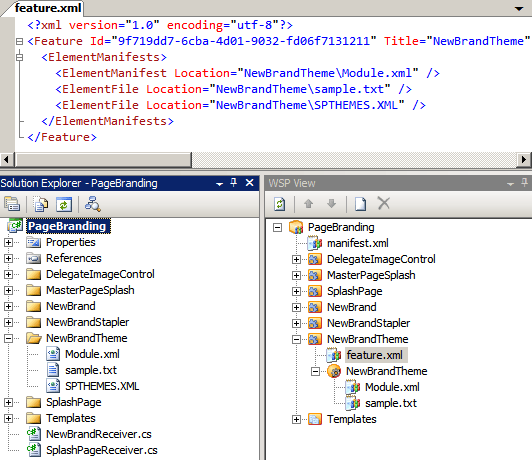
Less prevalent but equally disarming is that the project just ignores files that it doesn’t understand. I had originally planned to use the branding lab of the VSeWSS-based SharePoint Hands on Labs (download) as an example for my latest post on using features to update SPTHEMES.XML. The process went something like this:

  1. Open VSeWSS project
  2. Add New Item > Module
  3. In new feature: Add Existing Item > Browse to SPTHEMES.XML
  4. Switch to WSP view and update the feature.xml with the new <ElementFile />
  5. Deploy
  6. Error: Cannot find this file specified in the manifest file:
    NewBrandTheme\NewBrandTheme\SPTHEMES.XML
  7. Sigh…

Missing ElementFile
The only way I could get my file included in the solution was to add it to the module:
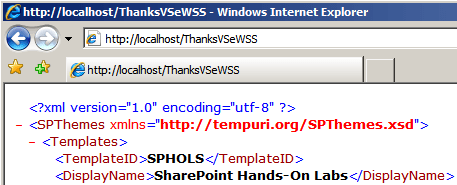
<File Path="SPTHEMES.XML" Url="ThanksVSeWSS" />
Which has an undesired side effect:
Thanks VSeWSS

Ultimately the problem comes down to the tool not allowing someone that knows better to take control. A bike with permanent training wheels is eventually outgrown.

As A CAML Tool

Specific limitations aside, Chris did hit on a very important use of the extensions: heavy lifting of the XML files. I have found no better way to generate the extensive XML required for List Definitions Templates, Content Types and such. (For more help authoring XML, check out AC’s tools.) New developers in particular should use the extensions to build a few content types, lists, instances, etc. to see how everything fits together. But what if we want to use these XML files with another solutionizing method (WSPBuilder, STSDEV, PowerShell, batch files)? We could certainly retrieve them from the 12 hive after deployment, but it turns out there’s an easier way.

When a VSeWSS project is deployed, it stores the full directory structure of the WSP in $(TargetDir)\solution. All we need to do is pull the appropriate folders into a new project built with the tool of your choice: LAYOUTS, IMAGES, etc. into TEMPLATE; feature folders into TEMPLATE\FEATURES; and so forth. Note that the solution directory only stays populated if the deployment succeeds, and you will need to retract the VSeWSS solution (or change the feature IDs) before you can install the features as part of the new solution. Just like SPD, we use the tool for its strengths and then pull what we need out into a project of our own design. I imagine a similar approach could probably be used with WebParts, though I haven’t done anything with them in VSeWSS.

Ultimately I have to agree with Scot that, despite tremendous potential for future releases, for now VSeWSS just doesn’t quite have the flexibility needed for sophisticated solution development. That said, it’s very solid in its strengths and definitely has its uses in the context of your chosen development approach.

Posted in SharePoint, Tools. Tags: . 3 Comments »

Theme-amajig: Updating SPTHEMES.XML Through a Feature

Love them or hate them, SharePoint themes do have their uses in some approaches to branding. As Dan Lewis recently posted, the process to create a theme is pretty simple, but there’s one step that makes me cringe: edit SPTHEMES.XML. I’m not aware of any out-of-box mechanism to facilitate this change, so I figured it might be worthwhile to build one.

In researching the idea, I found this post by Rick Kierner. He’s on the right track, but his solution only deploys the theme to the local server and a web-scoped feature isn’t really appropriate for a server-wide change. Ultimately I came up with the following solution, which should be easier to maintain and is perhaps a bit more SharePointy.

The Feature

First, we create a farm-scoped feature with a single <ElementFile /> node:

<Feature
  Id="E2F8D046-607D-4BB6-93CC-2C04CF04099E"
  Title="SPHOLS Themes"
  Description="Installs SPHOLS and SPHOLSX themes on farm."
  Version="1.0.0.0"
  Scope="Farm"
  ReceiverAssembly="MyBranding, ..."
  ReceiverClass="MyBranding.MyThemesFeatureReceiver"
  xmlns="http://schemas.microsoft.com/sharepoint/">
  <ElementManifests>
    <ElementFile Location="SPTHEMES.XML" />
  </ElementManifests>
</Feature>

Then we create our own SPTHEMES.XML with the theme(s) we would like to add, saved in the same folder as feature.xml.

<?xml version="1.0" encoding="utf-8"?>
<SPThemes xmlns="http://tempuri.org/SPThemes.xsd">
  <Templates>
    <TemplateID>SPHOLS</TemplateID>
    <DisplayName>SharePoint Hands-On Labs</DisplayName>
    <Description>A glorious theme created for the SharePoint Hands-On Labs.</Description>
    <Thumbnail>images/SPHOLS/thSPHOLS.gif</Thumbnail>
    <Preview>images/SPHOLS/thSPHOLS.gif</Preview>
  </Templates>
  <Templates>
    <TemplateID>SPHOLSX</TemplateID>
    <DisplayName>SharePoint Hands-On Labs X</DisplayName>
    <Description>An XTRA glorious theme created for the SharePoint Hands-On Labs.</Description>
    <Thumbnail>images/SPHOLS/thSPHOLS.gif</Thumbnail>
    <Preview>images/SPHOLS/thSPHOLS.gif</Preview>
  </Templates>
</SPThemes>

And finally, our feature receiver:

namespace MyBranding {
  public class MyThemesFeatureReceiver : SPFeatureReceiver {
    private const string THEMES_FILE = "SPTHEMES.XML";

    public override void FeatureActivated(SPFeatureReceiverProperties properties) {
      if (properties == null)
        throw new ArgumentNullException("properties");
      FeatureThemesJob.InstallThemes(properties.Definition, THEMES_FILE);
    }

    public override void FeatureDeactivating(SPFeatureReceiverProperties properties) {
      if (properties == null)
        throw new ArgumentNullException("properties");
      FeatureThemesJob.DeleteThemes(properties.Definition, THEMES_FILE);
    }

    public override void FeatureInstalled(SPFeatureReceiverProperties properties) { }
    public override void FeatureUninstalling(SPFeatureReceiverProperties properties) { }
  }
}

That’s it. When the feature is activated, the contents of the feature’s “themes file” are merged into the farm servers’ SPTHEMES.XML. While deactivating, those same themes will be deleted. The heavy lifting is handled by a reusable custom timer job.

FeatureThemesJob

Our custom job begins with a few persisted fields and constructors:

using System;
using System.Diagnostics;
using System.IO;
using System.Xml;
using System.Xml.XPath;
using Microsoft.SharePoint;
using Microsoft.SharePoint.Administration;
using Microsoft.SharePoint.Utilities;

namespace MyBranding {
  public class FeatureThemesJob : SPJobDefinition {
    [Persisted]
    private Guid _featureID = Guid.Empty;
    [Persisted]
    private string _themesFile = null;
    [Persisted]
    private bool _delete = false;

    public FeatureThemesJob() : base() { }

    public FeatureThemesJob(SPService service, Guid featureID, string themesFile, bool delete)
      : base("Feature Themes", service, null, SPJobLockType.None) {
      _featureID = featureID;
      _themesFile = themesFile;
      _delete = delete;

      Title = string.Format("{0} Themes for Feature {1}",
          (delete ? "Delete" : "Install"), featureID);
    }

The default constructor is required for internal use and our real constructor saves the field values and lets SPJobDefinition do its thing.

Our Execute override uses a helper method that takes two paths: the path to the server’s SPTHEMES.XML and the path to our feature’s themes file.

    private const string SPTHEMES_PATH = @"TEMPLATE\LAYOUTS\1033\SPTHEMES.XML";
    public override void Execute(Guid targetInstanceId) {
      SPFeatureDefinition fDef = Farm.FeatureDefinitions[_featureID];
      if (fDef != null)
        DoMerge(SPUtility.GetGenericSetupPath(SPTHEMES_PATH), Path.Combine(fDef.RootDirectory, _themesFile));
    }

First we open the XML files and do a bit of initial setup:

    public void DoMerge(string pathToSPThemes, string pathToMerge) {
      try {
        XmlDocument docThemes = new XmlDocument();
        docThemes.Load(pathToSPThemes);
        string nsThemes = docThemes.DocumentElement.NamespaceURI;

        XPathNavigator navThemes = docThemes.CreateNavigator();
        XmlNamespaceManager mgrThemes = new XmlNamespaceManager(navThemes.NameTable);
        mgrThemes.AddNamespace("t", nsThemes);

        XmlDocument docMerge = new XmlDocument();
        docMerge.Load(pathToMerge);

        XPathNavigator navMerge = docMerge.CreateNavigator();
        XmlNamespaceManager mgrMerge = new XmlNamespaceManager(navMerge.NameTable);
        mgrMerge.AddNamespace("t", docMerge.DocumentElement.NamespaceURI);

        bool shouldSave = false;

Now we use XPath to retrieve and iterate over a list of the themes in our feature.

        XmlNodeList mergeNodes = docMerge.SelectNodes("/t:SPThemes/t:Templates/t:TemplateID", mgrMerge);
        foreach (XmlNode mergeNode in mergeNodes) {

And use XPath again to find an existing theme with the same TemplateID.

          try {
            string xpath = string.Format("/t:SPThemes/t:Templates[t:TemplateID = '{0}']", mergeNode.InnerText);
            XmlNode node = docThemes.SelectSingleNode(xpath, mgrThemes);

If we’re deleting and we find the theme node, get rid of it.

            if (_delete) {
              if (node != null)
                node.ParentNode.RemoveChild(node);
            }

Otherwise create a Templates element for the new theme. I’m assuming this part could be cleaned up with a deeper understanding of the XML object model — help! For now I just copy the source XML into a new node in the destination document. I iterate through the new children and RemoveAllAttributes() to eliminate extra xmlns attributes that I can’t figure out how to prevent.

            else {
              XmlNode newNodeParent = mergeNode.ParentNode;
              XmlElement toInsert = docThemes.CreateElement(newNodeParent.Name, nsThemes);
              toInsert.InnerXml = newNodeParent.InnerXml;
              foreach (XmlElement xe in toInsert.ChildNodes)
                xe.RemoveAllAttributes();

              if (node == null)
                docThemes.DocumentElement.AppendChild(toInsert);
              else
                node.ParentNode.ReplaceChild(toInsert, node);
            }

If we get to this point, everything went fine and we should save our results.

            shouldSave = true;
          }
          catch (Exception ex) {
            Trace.WriteLine("Error merging theme " + mergeNode.InnerText);
            Trace.WriteLine(ex);
          }
        } // foreach mergeNode

        if (shouldSave)
          docThemes.Save(pathToSPThemes);
      }
      catch (Exception ex) {
        Trace.WriteLine("Failed to merge themes");
        Trace.WriteLine(ex);
        throw;
      }
    }

Now that the job is defined, we can add a few helpers. First, a method to run the job immediately—a technique borrowed from Vincent Rothwell—combined with a variation on AC’s technique to delete existing jobs:

    public void SubmitJobNow() {
      if (Farm.TimerService.Instances.Count < 1)
        throw new SPException("Could not run job. Timer service not found.");

      foreach (SPJobDefinition job in Service.JobDefinitions)
        if (job.Name == Name)
          job.Delete();

      Schedule = new SPOneTimeSchedule(DateTime.Now.AddHours(-2));
      Update();
    }

Next, the static methods we used earlier in the feature receiver.

    public static void InstallThemes(SPFeatureDefinition def, string themesFile) {
      MergeFeatureThemes(def, themesFile, false);
    }
    public static void DeleteThemes(SPFeatureDefinition def, string themesFile) {
      MergeFeatureThemes(def, themesFile, true);
    }

These share our final helper, which iterates through the web services on the farm and starts our job for each of them.

    private static void MergeFeatureThemes(SPFeatureDefinition def, string themesFile, bool delete) {
      if (def == null)
        throw new ArgumentNullException("def");

      SPFarm f = def.Farm;
      if (f == null)
        f = SPFarm.Local;

      foreach (SPWebService svc in new SPWebServiceCollection(f)) {
        FeatureThemesJob itj = new FeatureThemesJob(svc, def.Id, themesFile, delete);
        itj.SubmitJobNow();
      }
    }
  }
}

I’m sure there are improvements to be made, and I’m not certain I’ve properly handled all the multi-server scenarios, but it’s a start. What do you think?

Also, while we’re on the topic of features creating custom timer jobs, check out Vincent’s post on issues related to accounts and jobs. The gist is that features that create jobs should be scoped at the WebApplication or Farm level to ensure sufficient permissions to modify the configuration database.

Update 7/13/2008: Theme-amajig Refactored: Using Feature Properties

Update 11/28/2008: Bugs in the original post have been corrected. I also added a release on Codeplex with sample code: Sample Generated Theme Solution; you can generate your own with my STSDEV Theme Solution Generator.
Web Service Results – XPath is your friend!

Yesterday Eric Shupps posted about retrieving error messages from SharePoint web services. I noticed he uses XPath to retrieve the error codes, but then falls back on object manipulation to filter for real errors and to retrieve the error message:

XmlNode ndRoot = xmlResult.SelectSingleNode("sp:Results", nsMgr);
// Find the ErrorCode node, which exists for all operations regardless of status.
XmlNodeList nlResults = ndRoot.SelectNodes("//sp:Result/sp:ErrorCode", nsMgr);
// Loop through the node collection and find each ErrorCode entry
foreach (XmlNode ndResult in nlResults) {
  // Check the value of the node to determine its status
  if (ndResult.InnerText != "0x00000000") {
    XmlNode ndError = ndResult.NextSibling;
    string sError = ndError.InnerText;
    …

Just like we wouldn’t omit a SQL WHERE clause in favor of filtering a DataSet with string comparison, we should probably let XPath do as much for us as possible. In this case a few tweaks reduce the logic to a single selection, also offering a quick exit if there are no errors found:

// Find the ErrorText for Result nodes with non-zero ErrorCode.
string xpath = "/sp:Results/sp:Result[sp:ErrorCode != '0x00000000']/sp:ErrorText";
XmlNodeList nlErrors = xmlResult.SelectNodes(xpath, nsMgr);
if (nlErrors.Count == 0) {
  // No errors - return "Success", false, null, whatever
}
foreach (XmlNode ndError in nlErrors) {
  string sErrorText = ndError.InnerText;
  …

As Eric mentioned, there are a few ways to handle the error(s) returned. I thought it might be useful to pair the ErrorText with the ID of the method that generated it:

// Key = Method ID; Value = Error Text
static Dictionary<string, string> GetErrors(XmlDocument xmlResult) {
  XmlNamespaceManager nsMgr = new XmlNamespaceManager(xmlResult.NameTable);
  XmlElement ndRoot = xmlResult.DocumentElement;
  nsMgr.AddNamespace("sp", ndRoot.NamespaceURI);

  // Find the ErrorText for Result nodes with non-zero ErrorCode.
  string xpath = "/sp:Results/sp:Result[sp:ErrorCode != '0x00000000']/sp:ErrorText";
  XmlNodeList nlErrors = ndRoot.SelectNodes(xpath, nsMgr);

  if (nlErrors.Count == 0) {
    return null;
  }

  Dictionary<string, string> errorDict = new Dictionary<string, string>(nlErrors.Count);
  foreach (XmlNode ndError in nlErrors) {
    XmlNode ndResultId = ndError.ParentNode.Attributes["ID"];
    if (ndResultId != null) {
      errorDict.Add(ndResultId.Value, ndError.InnerText);
    }
  }
  return errorDict;
}

I figure a single XPath selection plus a reference to ParentNode would be more efficient than selecting the Result node for the ID and then finding its ErrorText child from there. And of course if there are better ways to do this, please share!

Disposing list’s SPSite/SPWeb without ParentWeb

Update 12/10/2008: Don’t use this technique; use the guidance here instead: The New Definitive SPSite/SPWeb Disposal Article

Chris O’Brien’s recent post discusses the need to dispose of SPSite and SPWeb objects, but only if they didn’t come from SPContext. To do this he depends on a list’s ParentWeb property, which currently returns the same instance as the original SPWeb. However, he notes that this strategy depends on the internal implementation of ParentWeb, which (however unlikely) might change.

As a future-proof alternative, I propose capturing the SPWeb as an out parameter if it will need to be disposed:

public void DoSomething() {
  SPWeb webToDispose = null;
  SPList list = getList(out webToDispose);

  // do something with list..
  foreach (SPListItem item in list.Items) {
    processItem(item);
  }

  // ** PROBLEM - how do we now dispose of the SPSite/SPWeb objects we created earlier? **
  // ** SOLUTION - if we didn't use context, webToDispose has reference
  if (webToDispose != null) {
    webToDispose.Dispose();
    webToDispose.Site.Dispose();
  }
}

private SPList getList(out SPWeb webToDispose) {
  webToDispose = null;

  SPContext currentContext = SPContext.Current;
  SPList list = null;

  if (currentContext != null) {
    list = currentContext.Site.AllWebs["MyWeb"].Lists["MyList"];
  }
  else {
    SPSite site = new SPSite("http://solutionizing.net");
    webToDispose = site.OpenWeb("/MyWeb");
    list = webToDispose.Lists["MyList"];
  }

  return list;
}

This code should be functionally equivalent and perhaps a bit easier to read, but without the dependency on ParentWeb. Thoughts?

Also, to add to Chris’s list of required reading, check out Roger Lamb’s excellent SharePoint 2007 and WSS 3.0 Dispose Patterns by Example.

Update 7/23/2008: How ironic…Chris and I have a leak! If you can’t spot it, I explain here.

Finding an SPWebApplication by ID

Not sure if it was me that prompted Neil’s post, but a question that came up earlier today was how to retrieve an SPWebApplication from its ID. Neil suggested trying to retrieve the generic SPPersistedObject by that ID, which eventually led me to SPFarm.GetObject(Guid).

SPFarm farm = SPFarm.Local;
Guid webAppId = new Guid("e81de291-7205-42fe-8228-422c6bbed277");
SPWebApplication webApp = farm.GetObject(webAppId) as SPWebApplication;
Debug.WriteLine(webApp);

Have I overlooked another method, or is this really the only way?

Bonus tip: Use SPAdministrationWebApplication.Local to get the web app for Central Admin.

Resistance is Futile

So I just got back from the Twin Cities SharePoint Camp where I had several interesting conversations that ended with more questions than answers, as I’ve found is often the case as a SharePoint developer. As much fun as it is pseudo-anonymously commenting on various blog posts, I’ve been frustrated for a while leaving URL blank. So at the urging of Raymond Mitchell, here I am. Blogger WordPress is probably temporary, but if I wait to put something “me” together it will probably never get off the ground. So without further ado, welcome to Solutionizing .NET!

Why Solutionizing? Well for the past several months I’ve been up to my neck in SharePoint as an application platform. And it has become increasingly clear that Solutions — limitations and MAKECAB.EXE aside — are fundamental to the process. However, a lot of questions remain as to how Solutions should be built and how their limitations can be overcome. This blog will be my humble attempt to answer some of those questions. I make no claims of expertise, just a desire to get better at what I do and contribute to the community that has been so helpful to me thus far.

Cheers ~
Keith

Posted in General. Comments Off on Resistance is Futile