Safely Process SPSite.AllWebs

Probably the ugliest scenario for properly disposing SPWeb objects is cleaning up when you enumerate SPSite.AllWebs. To simplify that task, I present a pair of LINQ-inspired extension methods:

public static void ForEach(this SPWebCollection webs, Action<SPWeb> action)
{
    foreach (SPWeb web in webs)
    {
        action(web);
        web.Dispose();
    }
}

public static IEnumerable<TResult> Select<TResult>(this SPWebCollection webs, Func<SPWeb, TResult> action)
{
    List<TResult> res = new List<TResult>(webs.Count);
    webs.ForEach(w => res.Add(action(w)));
    return res;
}

public static IEnumerable<TResult> Select<TResult>(this SPWebCollection webs, Func<SPWeb, TResult> selector)
{
    foreach (SPWeb web in webs)
    {
        TResult ret = selector(web);
        web.Dispose();
        yield return ret;
    }
}

Combined with lambda expressions, we can cleanly handle tasks that would ordinarily require more code and explicit disposal. Want a list of your web URLs?

var urls = site.AllWebs.Select(w => { return w.Url; });

How about updating a property on every web?

site.AllWebs.ForEach(w =>
{
    w.Properties["MyProp"] = DateTime.Now.ToString();
    w.Properties.Update();
});

We can even leverage anonymous types:

var props = site.AllWebs.Select(w =>
{
    return new
    {
        w.Title,
        w.Url,
        MyProp = w.Properties["MyProp"]
    };
});

Speaking of LINQ and SharePoint, check out Adam Buenz‘s post on using LINQ’s IEnumerable.Cast<T> with SharePoint collections to get IQueryable support. And while using LINQ for filtering and such may be prettier, resist the urge to skip CAML altogether: there is definitely a performance advantage in filtering your SPListItemCollection with an SPQuery, especially for large lists. I can’t seem to find any hard data on this, so I nominate Waldek Mastykarz to investigate – his analyses of other performance topics were great.

Update 12/10/2008: New, improved Select! Discussed here.

The New Definitive SPSite/SPWeb Disposal Article

As I’ve posted before, properly cleaning up your SPSite and SPWeb objects is an important yet confusing consideration in writing good SharePoint object model code. There are some decent articles out there already, but Stefan Goßner just posted the best guidance – by far – I’ve seen on the subject: Disposing SPWeb and SPSite objects. Seriously, go read it.

In my view, Stefan hit on four key points that bear repeating:

1. Ensure that you only dispose SPSite and SPWeb objects that your code owns.

Examples that you don’t own, most of which I have seen incorrectly disposed in various examples online:

  • SPContext.Current.Web
  • SPContext.Current.Site
  • SPContext.Current.Site.RootWeb
  • SPFeatureReceiverProperties.Feature.Parent for a Site- or Web-scoped feature receiver
  • SPWebEventProperties.Web
  • SPListEventProperties.Web
  • SPListEventProperties.List.Web
  • SPItemEventProperties.ListItem.Web
  • UnsecuredLayoutsPage.Web (and LayoutsPageBase.Web)
  • SPWebProvisioningProperties.Web
  • SPControl.GetContextWeb()
  • SPControl.GetContextSite()

In general, there are three common cases where you do own the object:

  • When you new up your own SPSite object:
    SPSite site = new SPSite(url);
  • When you explicitly call SPSite.OpenWeb():
    SPWeb web = site.OpenWeb(url);
  • When you iterate through SPSite.AllWebs – this is an extremely expensive operation, so avoid if possible:
    foreach(SPWeb web in site.AllWebs) {
    // …
    web.Dispose();
    }

If you think of any other examples I should include in these lists, leave a comment and I’ll update the post.

2. An SPWeb or SPSite object you own should be disposed as soon as it is no longer needed.

Stefan’s post has a great explanation, which he neatly summarizes:

You should dispose a SPWeb or SPSite object after the last access to a child object of this object. Be aware that a sub site (SPWeb) is not a child object. But (e.g.) a list or a folder or list item is a child object for this scenario.

3. Using a disposed SPWeb or SPSite object (like might happen if you Dispose something that doesn’t belong to you) can cause exceptions.

While it’s great to Dispose properly, it’s dangerous to Dispose improperly: when in doubt, in my opinion, err on the side of caution and let SharePoint clean up the mess. For webs, that happens when the parent site is disposed. For sites, that happens when the thread ends. If you do have memory problems, check out Stefan’s post on Troubleshooting SPSite/SPWeb leaks in WSS v3 and MOSS 2007.

4. SPSite and SPWeb objects should be disposed in the same method they get allocated.

And as a corollary to this, I agree with Chris O’Brien‘s conclusion, almost as an afterthought, in a recent post:

However, if the caller has to provide the IDisposable objects, it can then be responsible for calling Dispose() because it knows when they are no longer needed. Most often the caller will simply be passing a reference to SPContext.Current.Web, but if the caller happens to be a Feature receiver then SPFeatureProperties.ListItem.Parent.Web would be passed, or if no existing SPWeb object was available to the caller (e.g. console app) a new SPWeb object would have to be instantiated and passed. Disposals then become much simpler because they can always happen in the same place as any instantiations.

If the logic that utilizes the SPSite/SPWeb is encapsulated within a function that receives it as an argument, there is no risk of leaks. Most simply, there is little risk when the code looks like this:

using (SPWeb web = SPContext.Current.Site.OpenWeb()) {
  DoSomethingWith(web);
}

Now, some developers like to encapsulate the SPSite/SPWeb retrieval logic in dedicated methods. A safe approach is to leverage delegates. Unfortunately, variations of an unsafe alternative are much more common (in this case, copied from an otherwise brilliant MVP’s blog):

public static SPWeb ReturnSPWeb(string url) {
  using (var site = new SPSite(url)) {
    using (SPWeb web = site.OpenWeb()) {
      return web;
    }
  }
}

When you return from within a using block, the compiler will insert a Dispose on the used object before returning. Open your assembly in ildasm if you don’t believe me. So the above code is effectively equivalent to the following:

public static SPWeb ReturnSPWeb(string url) {
  var site = new SPSite(url);
  SPWeb web = site.OpenWeb();
  web.Dispose();
  site.Dispose();

  return web;
}

Oops! Before they even got a chance to do anything, the objects were cleaned up, and more importantly any code that depends on the returned SPWeb is completely unsafe! The same would apply for child objects (SPList, etc) returned from within a using block around the parent object. Even if the code works most of the time, the bugs it could introduce would be nearly impossible to track down.

Thanks again to Stefan for the excellent post!

Last updated 12/8/2008

IASPUG December Recap

Despite the miserable roads, we had a good crowd show up for Kirk‘s talk. The deck should be available shortly. Also, thanks to ITAGroup for hosting and to Todd for making the trip with some books to give away. Enjoy the holidays and we hope to see you in February!

I was also asked two good questions during the break, which I thought I would share here:

Q: What’s the best way to hide a list field?

A: There are a lot of examples online of using SPD to replace the default new/edit/display list forms, but they are clumsy, break support for attachments (unsupported hack and hotfix notwithstanding), and require customizing (unghosting) the page.

An easier solution is to leverage these properties of SPField:

  • ShowInDisplayForm
  • ShowInEditForm
  • ShowInListSettings
  • ShowInNewForm
  • ShowInVersionHistory
  • ShowInViewForms

These values can be set in a feature receiver or a simple console application, but it’s trivial with PowerShell, as Christian Lessner shows here. Or if you’re writing a feature for a custom content type/list template, the FieldRef element has a similar set of attributes.

Q: Is it possible to e-mail an item in a document library as part of an SPD workflow?

A: While not supported out of the box, I figured it would be possible through custom code. Kirk pointed me to the SPDActivities project on CodePlex, which has an activity to Send Email with List Item attachments. I’m not sure if it works for files in a document library, but it should be an easy fix if it doesn’t.

Posted in Community, Object Model, SharePoint. Tags: , , , , , . Comments Off on IASPUG December Recap

Isolator for SharePoint

With a few exceptions, the SharePoint developer community has been relatively quiet about unit testing and TDD, in part because so much code has tight dependencies on the object model. However, Andrew Woodward recently posted a whitepaper on the subject that caught my eye: Unit Testing SharePoint Solutions – Getting into the Object Model. Featured in the paper is Typemock Isolator, which has just been released in a special SharePoint-only version:

Typemock are offering their new product for unit testing SharePoint called Isolator For SharePoint, for a special introduction price. it is the only tool that allows you to unit test SharePoint without a SharePoint server. To learn more click here.

The first 50 bloggers who blog this text in their blog and tell us about it, will get a Full Isolator license, Free. for rules and info click here.

Posted in Object Model, SharePoint, Tools. Tags: , . Comments Off on Isolator for SharePoint

Iowa SharePoint User Group Returns

The Iowa SharePoint User Group returns on December 3 at ITAGroup in West Des Moines. My colleague Kirk Hofer will be presenting SharePoint Development Deep Dive: How SharePoint Works:

Go under the covers and get a great understanding of how SharePoint sites are created.  We will walk through how SharePoint works from the internals of Site Definitions and Site Templates.  Look at how Features work and how the different versions of SharePoint “staple” on additional items.  Ever wonder what the best options are for creating your own?  We will those options in great detail.

Details:

If you have ideas or requests for future IASPUG topics, please send them to info@sharepointia.com.

Posted in Community. Tags: , , . Comments Off on Iowa SharePoint User Group Returns

INotifyPropertyChanged Dependency Properties for Silverlight PathTextBlock

I’ve had my eye on Silverlight for a while, but haven’t had much reason to do anything with it. However, I recently stumbled on Bill Reiss‘s PathTextBlock project (via Tim Heuer) and thought I’d try to help out as an excuse to dabble. In addition to implementing a naive 3D projection transform, I wanted to add support for bindable dependency properties. It was harder than it should have been, but the eventual solution turned out to be pretty elegant so I thought I’d share it here.

Defining a DependencyProperty

If you’re not familiar, the general stub for a DependencyProperty in MyClass looks something like this:

  public static readonly DependencyProperty MyStringProperty =
      DependencyProperty.Register(
          "MyString",
          typeof(string),
          typeof(MyClass),
          new PropertyMetadata("My Default Value", MyClass.OnPropertyChanged));

  public string MyString {
    get { return (string)GetValue(MyStringProperty); }
    set { SetValue(MyStringProperty, value); }
  }

  protected static void OnPropertyChanged(DependencyObject d,
      DependencyPropertyChangedEventArgs e) { ... }

For more information on dependency properties, check out this article on MSDN. Note that the "MyString" parameter is the name of the property and that DependencyProperty has a public Name property (in .NET 3.0).

Implementing INotifyPropertyChanged

Now that MyString is a DependencyProperty, we just need to implement INotifyPropertyChanged on MyClass. In WPF, that could look something like this:

  public event PropertyChangedEventHandler PropertyChanged;

  protected static void OnPropertyChanged(DependencyObject d,
      DependencyPropertyChangedEventArgs e) {
    var m = d as MyClass;
    if (m != null) {
      DependencyProperty p = e.Property;
      if (pcdo.PropertyChanged != null)
        pcdo.PropertyChanged(p, new PropertyChangedEventArgs(p.Name));
    }
  }

Unfortunately, the .NET 3.0 implementation wasn’t good enough for Silverlight. In the Silverlight version of DependencyProperty, the Name property is nowhere to be found! It’s actually still there, it’s just internal for some reason. Since we can’t retrieve the name from the property object, I use a dictionary to cache the names instead. At the same time, let’s define a few helper methods to hide the dictionary:

  private static Dictionary<DependencyProperty, string> props =
      new Dictionary<DependencyProperty, string>();

  protected static DependencyProperty Register(
      string name,
      Type propertyType,
      Type ownerType,
      object defaultValue) {
    return Register(name, propertyType, ownerType, defaultValue, OnPropertyChanged);
  }

  protected static DependencyProperty Register(
      string name,
      Type propertyType,
      Type ownerType,
      object defaultValue,
      PropertyChangedCallback callback) {
    DependencyProperty prop =
        DependencyProperty.Register(
            name,
            propertyType,
            ownerType,
            new PropertyMetadata(defaultValue, callback));
    props.Add(prop, name);
    return prop;
  }

  protected static void OnPropertyChanged(DependencyObject d,
      DependencyPropertyChangedEventArgs e) {
    var m = d as MyClass;
    if (m != null) {
      DependencyProperty p = e.Property;
      string propertyName = props.ContainsKey(p) ? props[p] : "Unknown";
      if (m.PropertyChanged != null)
        m.PropertyChanged(p, new PropertyChangedEventArgs(propertyName));
    }
  }

And we can use our new Register method to initialize our properties:

  public static readonly DependencyProperty MyStringProperty =
      Register("MyString", typeof(string), typeof(MyClass), "My Default Value");
  public static readonly DependencyProperty MyBoolProperty =
      Register("MyBool", typeof(bool), typeof(MyClass), true);

<Rant>

I really wish MS would lay off the internal access modifier. This case was pretty easy to work around, but there are other instances where it’s a significant barrier. For example, the PathTextBlock project defines its own Transform and TransformGroup classes that are functionally identical to those provided by the SL-FCL. The FCL’s GeneralTransform and Transform classes are even public…too bad their only constructor is internal!! So rather than build on the existing framework, the wheel gets reinvented. Grrr!

</Rant>

Frustrations aside, the solution works really well for data-bindable dependency properties. For PathTextBlock, I built the above code into a generic PropertyChangedDependencyObject class from which to inherit. One thing to note: if a subclass hides the base OnPropertyChanged method, like I do in Transform, the property registration needs a reference to the new OnPropertyChanged. Feel free to check out the latest source on CodePlex for the full working sample.

SharePoint in Iowa?

The other day Chris Sutton posted about the growing .NET community in Iowa. I was definitely impressed by the turnout at the last Iowa Code Camp, where I saw Chris’s talk on ASP.NET MVC as well as top-notch SharePoint presentations by Todds Klindt and Bleeker, and am looking forward to more at the upcoming camp on Nov. 8.

While there’s general .NET growth in the area, the Iowa SharePoint scene seems rather quiet. The Iowa SharePoint User Group has been on hiatus for a while and other than Todd Klindt, the only other Iowan I can find is Darrin Bishop, who presented at the October IADNUG meeting. The SharePoint sessions at the last code camp were full and there are several scheduled for this next one, so I know we’re not alone…

I guess I have two questions:

  1. Is there anybody out there?
  2. Is there any interest in getting the user group up an running again?

Multi-Purpose PowerShell Using Function

It’s always bothered me that there isn’t a clean way to deal with IDisposables in PowerShell. It seems Adam Weigert came to the same conclusion and implemented a using function much like the statement found in C# and VB. Note that he also makes use of his implementation of PowerShell try..catch..finally, which is pretty slick. Meanwhile, I’m told Raymond Mitchell has his own using function that he uses to load assemblies, which certainly makes sense to me.

I figure the next evolution is to provide a generic using that covers all the bases:

function using {
    param (
        $inputObject = $(throw "The parameter -inputObject is required."),
        [ScriptBlock] $scriptBlock
    )

    if ($inputObject -is [string]) {
        if (Test-Path $inputObject) {
            [system.reflection.assembly]::LoadFrom($inputObject)
        } elseif($null -ne (
              new-object System.Reflection.AssemblyName($inputObject)
              ).GetPublicKeyToken()) {
            [system.reflection.assembly]::Load($inputObject)
        } else {
            [system.reflection.assembly]::LoadWithPartialName($inputObject)
        }
    } elseif ($inputObject -is [System.IDisposable] -and $scriptBlock -ne $null) {
        Try {
            &$scriptBlock
        } -Finally {
            if ($inputObject -ne $null) {
                $inputObject.Dispose()
            }
            Get-Variable -scope script |
                Where-Object {
                    [object]::ReferenceEquals($_.Value.PSBase, $inputObject.PSBase)
                } |
                Foreach-Object {
                    Remove-Variable $_.Name -scope script
                }
        }
    } else {
        $inputObject
    }
}

Some notes on the code:

  • If $inputObject is a string, I assume it’s an assembly reference…
    • If the string is a path, load as a path
    • Rather than parse the string, I figure the framework knows best; the presence of a PublicKeyToken means it’s probably a full assembly name
    • I considered adding support for this alternative to LoadWithPartialName, but I don’t feel like managing a global “assembly map”; the deprecated shortcut will have to do for now
  • If $inputObject is IDisposable and a script block was supplied…
    • Wrap script execution in Try..Finally to make sure we get to Dispose()
    • Here I disagree with Adam – if the PSObject’s Dispose method was overridden, we should assume it was done for good reason (more on this in a later post) and that the override will respect the object’s disposability.
    • After disposal, I thought it might be nice to take the variable out of scope like C#/VB. Using -scope script will look at variables in the scope where our function was called, and since we don’t know what $inputObject was named before it was passed in, I just compare references instead.
  • Otherwise just punt the object along in the pipeline

Usage

Loading assemblies is pretty straightforward:

using System.Windows.Forms
using 'System.Web, Version=2.0.0.0, Culture=neutral, PublicKeyToken=b03f5f7f11d50a3a'
using C:\Dev\DisposeTest\bin\Debug\DisposeTest.dll

To test IDisposable handling, I use a simple disposable object which returns its hash code in ToString(), instantiated by a helper function:

function new-disp { new-object DisposeTest.Disposable }

To verify that variable scope is handled properly, we need two test scripts. gv is an alias for Get-Variable.

NestedTest.ps1

gv x
using ($x = new-disp) { gv x }
gv x

UsingTest.ps1

$x = 'X'
.\NestedTest.ps1
using ($y = new-disp) { gv y }
gv y

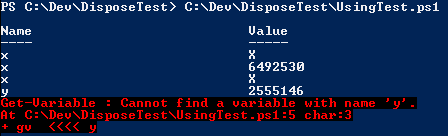
From the behavior in C#/VB, we expect that the object being ‘used’ will only be available within the scope of the script block. So when we enter NestedTest.ps1, we should see the $x remains ‘X’, inherited from the parent scope, both before and after the using statement. Similarly, we expect $y will not be accessible outside of the using block:

SharePoint Example

using Microsoft.SharePoint
using ($s = new-object Microsoft.SharePoint.SPSite('http://localhost/')) {
  $s.AllWebs | %{ using ($_) { $_ | select Title, Url } }
}
if($s -eq $null) { 'Success!' }

It’s not exceedingly friendly for interactive mode, particularly for tab completion, but it should aid script readability.

ContentDeploymentJobCollection GetEnumerator Not Implemented?

Mike Hodnick just posted about programmatically executing content deployment jobs and I figured I’d skip the console app in favor of PowerShell:

[system.reflection.assembly]::LoadWithPartialName("Microsoft.SharePoint.Publishing")
[Microsoft.SharePoint.Publishing.Administration.ContentDeploymentJob]::GetAllJobs()

And much to my surprise, I was greeted with a NotImplementedException:
NotImplementedException from ContentDeploymentJob.GetAllJobs() in PowerShell

However, the following works fine:

$cdj = [Microsoft.SharePoint.Publishing.Administration.ContentDeploymentJob]
$cdj::GetAllJobs().GetEnumerator() | %{ $_.Name; $_.Run() }

What’s going on here? Well first, let’s see if we can replicate the exception in the console app:
NotImplementedException from ContentDeploymentJob.GetAllJobs() in Console Application

Why would I think to explicitly cast the collection to IEnumerable in the first place? Well when PowerShell sees an enumerable object in the pipeline, it “unwraps” it to pass its members along to the next command in line. To facilitate this, I’m guessing the runtime does something to this effect:

if(currentItemInPipeline is IEnumerable)
  HandleEnumerable(currentItemInPipeline as IEnumerable);

And HandleEnumerable probably has a method signature like this:

void HandleEnumerable(IEnumerable enumerableItem) { ...

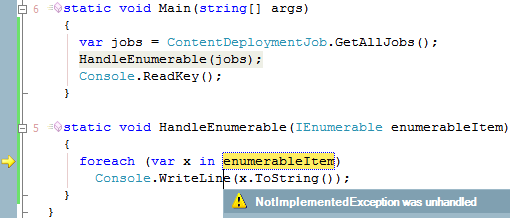
If we apply that pattern to our collection, we see the exception again:
NotImplementedException from ContentDeploymentJob.GetAllJobs() in HandleEnumerable

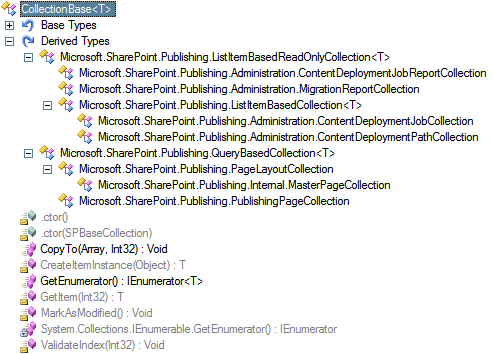
So what’s the big deal? Well, reflecting the object heirarchy above ContentDeploymentJobCollection we find CollectionBase<T>, which has two implementations of GetEnumerator:

public IEnumerator<T> GetEnumerator() {
    return new StandardEnumerator<T>((CollectionBase<T>) this);
}

IEnumerator IEnumerable.GetEnumerator() {
    throw new NotImplementedException();
}

The former is pretty standard; the latter is an explicit implementation of the interface method. When our ContentDeploymentJobCollection object is used as an IEnumerable, like my test variable and in HandleEnumerable (and presumably in the PowerShell runtime), the explicit implementation is used and throws the exception. On the other hand, if we make PowerShell use the implemented GetEnumerator, everything works as expected.

And for completeness, Mike’s foreach compiles into the following IL, calling the desired method:

callvirt   instance class [mscorlib]System.Collections.Generic.IEnumerator`1<!0> class [Microsoft.SharePoint.Publishing]Microsoft.SharePoint.Publishing.CollectionBase`1<class [Microsoft.SharePoint.Publishing]Microsoft.SharePoint.Publishing.Administration.ContentDeploymentJob>::GetEnumerator()

So if you’re getting a NotImplementedException when using a collection that inherits from Microsoft.SharePoint.Publishing.CollectionBase<T>, make sure you’re calling the correct GetEnumerator.

Collections affected:

  • Microsoft.SharePoint.Publishing.Administration.ContentDeploymentJobCollection
  • Microsoft.SharePoint.Publishing.Administration.ContentDeploymentJobReportCollection
  • Microsoft.SharePoint.Publishing.Administration.ContentDeploymentPathCollection
  • Microsoft.SharePoint.Publishing.Administration.MigrationReportCollection
  • Microsoft.SharePoint.Publishing.PageLayoutCollection
  • Microsoft.SharePoint.Publishing.PublishingPageCollection

Microsoft.SharePoint.Publishing.CollectionBase<T> Derived Types