SPList.ParentWeb Leaks Revisited

A while back I looked into whether or not SPList.ParentWeb really needs to be disposed: Is SPList.ParentWeb a Leak? The specific motivation was to investigate why SPList.BreakRoleInheritance() requires Dispose() on ParentWeb property, as seen in Roger’s Dispose Patterns by Example. I stand by my original conclusion that this advice generally does more harm than good, but thought it would be useful to discuss in a bit more detail.

Why dispose ParentWeb?

As I showed before, the code for SPList.ParentWeb works like this:

if (SPUtility.StsCompareStrings(this.m_Lists.Web.ServerRelativeUrl, this.ParentWebUrl))
  return this.m_Lists.Web;

if (this.m_parentWeb == null)
  this.m_parentWeb = this.m_Lists.Web.Site.OpenWeb(this.ParentWebUrl);
return this.m_parentWeb;

In the vast majority of cases, the URLs will match and return the parent collection’s Web, which should not be disposed (unless, of course, you own it and know it is ready for disposal). Only in the exceptional case that the list’s ParentWebUrl indicates it doesn’t live with its parent collection will a new SPWeb be created. I believe it is this exception, rather than the norm, that leads to Roger’s suggestion that ParentWeb should be disposed.

On a curious and somewhat related note, SPListItem.Web doesn’t use ParentWeb:

public SPWeb get_Web()
{
    return this.m_Items.List.Lists.Web;
}

Why BreakRoleInheritance()?

Though BreakRoleInheritance() has been singled out, the real culprit is an internal property:

private SPSecurableObjectImpl get_SecurableObjectImpl()
{
    if (this.m_SecurableObjectImpl == null)
    {
        Guid guidScopeId = (Guid) this.m_arrListProps[0x22, this.m_iRow];
        bool hasUniquePerm = guidScopeId != this.ParentWeb.RoleAssignments.Id;
        this.m_SecurableObjectImpl = new SPSecurableObjectImpl(this.ParentWeb, this, ...);
    }
    return this.m_SecurableObjectImpl;
}

This property is then used in the implementations of several methods/properties from ISecurableObject:

  • SPList.AllRolesForCurrentUser
  • SPList.BreakRoleInheritance()
  • SPList.HasUniqueRoleAssignments
  • SPList.ResetRoleInheritance()
  • SPList.ReusableAcl
  • SPList.RoleAssignments

(Incidentally, SPSecurableObjectImpl is also used by SPWeb and SPListItem to implement that interface.)
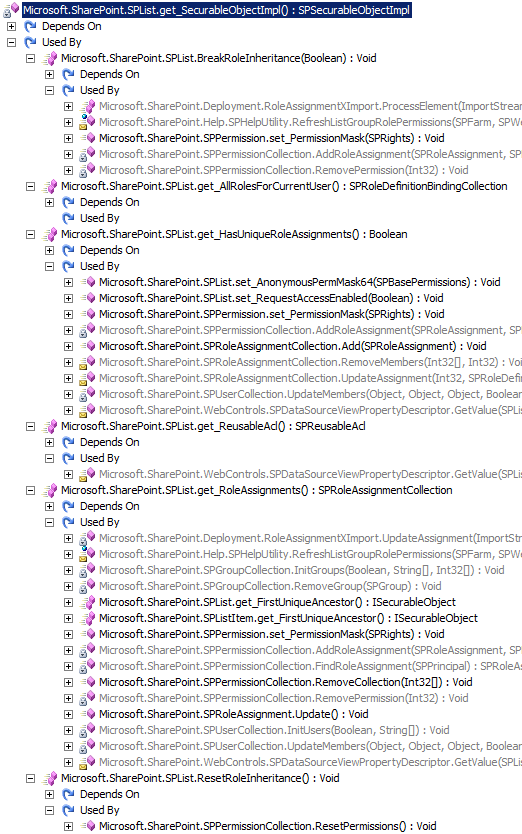
SPList.get_SecurableObjectImplSo now we’re dealing with several more points of entry. For example, in SPListItem:

public ISecurableObject get_FirstUniqueAncestor()
{
    this.InitSecurity();
    if (this.RoleAssignments.Id == this.ParentList.RoleAssignments.Id)
    {
        return this.ParentList.FirstUniqueAncestor;
    }
    if (!this.HasUniqueRoleAssignments)
    {
        return this.Web.GetFolder(this.m_strPermUrl).Item;
    }
    return this;
}

I could show several more obscure code paths with the same result, but the specifics are irrelevant. My point is that trying to figure out if SPList.ParentWeb has been referenced is a wasted effort.

What to do?

The way I see it, we have two options:

  1. Assume that ParentWeb is safe enough and if we have memory problems later we can investigate.
  2. Assume that ParentWeb is leaky and figure out a safe way to Dispose() it.

I’m satisfied with the former, but if you’re not — or if you have a circumstance where the ParentWebUrl comparison actually fails (please share) — then your code should check if it needs to dispose first:

SPWeb web = SPContext.Current.Web;
SPList list;

try
{
  list = web.Lists["ListName"];
  list.BreakRoleInheritance(true);
}
finally
{
  if(list.ParentWeb != web)
    list.ParentWeb.Dispose();
}

Or we can use an extension method:

public static void DisposeParentWeb(this SPList list)
{
  if(list.ParentWeb != list.Lists.Web)
    list.ParentWeb.Dispose();
}

The Semi-Disposable PublishingWeb

As if handling SPSite and SPWeb isn’t tedious enough, MOSS’s PublishingWeb class throws another wrench into things. Its constructors are internal, so references to it always come from within the framework. I’m currently aware of five sources of these objects:

  1. PublishingWeb.GetPublishingWeb() wraps an existing SPWeb reference that should already have a disposal plan.
  2. PublishingWeb.GetVariation() creates an internal SPWeb that is disposed on Close().
  3. PublishingWeb.ParentPublishingWeb creates an internal SPWeb that is disposed on Close(), but also references its Web‘s ParentWeb, which may or may not need to be disposed.
  4. PublishingWebCollection creates an internal SPWebCollection from which it pulls SPWebs that are not disposed on Close() of the child PublishingWebs.
  5. PublishingWebCollection.Add() creates an internal SPWeb that is disposed on Close().

Internally, PublishingWeb is set up relatively well to handle the complexity of wrapping a Disposable object. It provides two constructors: one that accepts an SPWeb, which it stores internally but does not mark as “owned”; and one that accepts a Uri and SPSite, from which it opens an SPWeb (and SPSite if necessary) that are marked as “owned” to be cleaned up later. This job is performed by Close(), which is even kind enough to add a trace message (level Medium) if an attempt is made to close a non-owned web:

PublishingWeb.Close(): currentWeb is owned by caller, so doing nothing. May indicate SPWeb leak in calling code.

One could argue that PublishingWeb should really be IDisposable, calling Close() from Dispose() (like SPWeb does), but for now we can get by with try...finally.

The Good

The internal ownership mechanism serves its purpose wonderfully for GetPublishingWeb(), GetVariation() and PublishingWebCollection.Add(). The former just defers to the SPWeb-accepting constructor with no need to close, and the latter two use the Uri+SPSite constructor and can be closed without hesitation.

using(SPWeb web = site.OpenWeb())
{
  PublishingWeb varPubWeb = null
  PublishingWeb newPubWeb = null;
  try
  {
    PublishingWeb pubWeb = PublishingWeb.GetPublishingWeb(web);

    VariationLabel label = Variations.Current[0];
    varPubWeb = pubWeb.GetVariation(label);
    // Process varPubWeb

    PublishingWebCollection pubWebs = pubWeb.GetPublishingWebs();
    newPubWeb = pubWebs.Add("NewPubWeb");
  }
  finally
  {
    // pubWeb.Close() would generate a trace warning
    if(null != varPubWeb)
      varPubWeb.Close();
    if(null != newPubWeb)
      newPubWeb.Close();
  }
}

The Bad

Things get a bit trickier with ParentPublishingWeb for two reasons:

  1. We are subject to all the usual concerns when dealing with SPWeb.ParentWeb:

    This property will allocate an SPWeb object the first time it is called. The caveat is that once it is disposed, any reference to the property will return the disposed object. If an SPWeb is not owned by the developer, its ParentWeb should be considered not owned as well. For example, there could be a problem if two components both depend on SPContext.Current.Web.ParentWeb and one calls Dispose() before the other is done with it.

  2. Internally ParentPublishingWeb uses the “owned” constructor, so we need to call Close(). However, it gets the parameters for that constructor from its Web‘s ParentWeb property. If we’re in a situation where we own the original SPWeb, we also now own its ParentWeb and will need to Dispose() it.

In a case where we definitely own the web and its ParentWeb, we need to do something like this:

using(SPWeb web = site.OpenWeb())
{
  PublishingWeb parentPubWeb = null;
  try
  {
    PublishingWeb pubWeb = PublishingWeb.GetPublishingWeb(web);
    parentPubWeb = pubWeb.ParentPublishingWeb;
    // Process parentPubWeb
  }
  finally
  {
    if(null != parentPubWeb)
      parentPubWeb.Close();
    if(null != web.ParentWeb)
      web.ParentWeb.Dispose();
  }
}

The Ugly

Given how hard PublishingWeb tries to do the right thing, I’m surprised how little PublishingWebCollection does to help us. It too has an internal constructor, so we can only get a collection from PublishingWeb.GetPublishingWebs(), which passes in the current web’s GetSubwebsForCurrentUser(). This SPWebCollection is then used to build the PublishingWeb objects returned by indexing into or enumerating over the collection. However, unlike PublishingWebCollection.Add(), the indexers use GetPublishingWeb(SPWeb) and thus the “not my problem” constructor. So rather than rely on Close(), we need to manually call Dispose() on the wrapped Web:

using(SPWeb web = site.OpenWeb())
{
  PublishingWeb pubWeb = PublishingWeb.GetPublishingWeb(web);
  PublishingWebCollection pubWebs = pubWeb.GetPublishingWebs());
  foreach(PublishingWeb innerPubWeb in pubWebs)
  {
    try
    {
      // Process innerPubWeb
    }
    finally
    {
      // innerPubWeb.Close() would generate a trace warning
      innerPubWeb.Web.Dispose();
    }
  }
}

Update 1/29/2009: Roger Lamb has added this GetVariation() guidance to his Dispose Patterns by Example.

Elegant SPSite Elevation

A common difficulty with SPSecurity.RunWithElevatedPrivileges (most recently lamented here) is that existing SPSite/SPWeb objects will not work with the elevated security context. The natural workaround is to create a new SPSite within the elevated delegate and off you go. However, Dan Larson has documented a better technique here, leveraging the SPSite constructor that accepts an SPUserToken. By passing the token of the system account (SHAREPOINT\system, an internal alias for the application pool identity), an elevated site is available without the complexity and complications of RunWithElevatedPrivileges.

With the emerging best practice of separating SPSite and SPWeb creation from the code that uses them, I have expanded on Dan’s technique with another series of extension methods. The first step is to get the system token from an existing SPSite, adapted from Dan’s example:

public static SPUserToken GetSystemToken(this SPSite site)
{
    SPUserToken token = null;
    bool tempCADE = site.CatchAccessDeniedException;
    try
    {
        site.CatchAccessDeniedException = false;
        token = site.SystemAccount.UserToken;
    }
    catch (UnauthorizedAccessException)
    {
        SPSecurity.RunWithElevatedPrivileges(() =>
        {
            using (SPSite elevSite = new SPSite(site.ID))
                token = elevSite.SystemAccount.UserToken;
        });
    }
    finally
    {
        site.CatchAccessDeniedException = tempCADE;
    }
    return token;
}

And then we simply provide methods to operate on an elevated site created with that token:

public static void RunAsSystem(this SPSite site, Action<SPSite> action)
{
    using (SPSite elevSite = new SPSite(site.ID, site.GetSystemToken()))
        action(elevSite);
}

public static T SelectAsSystem<T>(this SPSite site, Func<SPSite, T> selector)
{
    using (SPSite elevSite = new SPSite(site.ID, site.GetSystemToken()))
        return selector(elevSite);
}

Note that the object(s) returned by selector should not be SharePoint objects that hold references to a parent site/web.

It’s also useful to provide additional methods that simplify working with elevated webs:

public static void RunAsSystem(this SPSite site, Guid webId, Action<SPWeb> action)
{
    site.RunAsSystem(s => action(s.OpenWeb(webId)));
}

public static void RunAsSystem(this SPSite site, string url, Action<SPWeb> action)
{
    site.RunAsSystem(s => action(s.OpenWeb(url)));
}

public static void RunAsSystem(this SPWeb web, Action<SPWeb> action)
{
    web.Site.RunAsSystem(web.ID, action);
}

public static T SelectAsSystem<T>(this SPSite site, Guid webId, Func<SPWeb, T> selector)
{
    return site.SelectAsSystem(s => selector(s.OpenWeb(webId)));
}

public static T SelectAsSystem<T>(this SPSite site, string url, Func<SPWeb, T> selector)
{
    return site.SelectAsSystem(s => selector(s.OpenWeb(url)));
}

public static T SelectAsSystem<T>(this SPWeb web, Func<SPWeb, T> selector)
{
    return web.Site.SelectAsSystem(web.ID, selector);
}

I don’t bother to Dispose the webs created by these calls to s.OpenWeb() because I know s will be disposed shortly, cleaning up the web with it.

Usage

As an example, let’s refactor Nigel’s skeleton code:

protected override void CreateChildControls()
{
    SPWeb web = SPControl.GetContextWeb(Context);
    web.RunAsSystem(UpdateVisitorList);
}

private void UpdateVisitorList(SPWeb web)
{
    SPList visList = web.Lists[_visitorList];
    int existItemId = GetVisitorItemId(visList);

    web.AllowUnsafeUpdates = true;
    if (existItemId < 1)
    {
        SPListItem newItem = visList.Items.Add();
        // Set field values
        newItem.Update();
    }
    else
    {
        SPListItem oldItem = visList.GetItemById(existItemId);
        // Update field values
        oldItem.Update();
    }
    web.AllowUnsafeUpdates = false;
}

By separating the elevated operation from the logic required to elevate, the code is much easier to read and less prone to errors like leaking an elevated SPSite.

LINQ for SPWebCollection Revisited: AsSafeEnumerable

I have previously discussed implementations of some core LINQ extension methods for SPWebCollection, a process complicated by the fact that SPWeb is IDisposable. The core logic is correct, but the lack of try...finally means exceptions will cause leaks. Since this affects any enumeration of the list, not just LINQ-specific operations, I started to look into making the enumerator smarter. This turned out to be much simpler than I expected:

public static IEnumerable<SPWeb> AsSafeEnumerable(this SPWebCollection webs)
{
  foreach (SPWeb web in webs)
  {
    try
    {
      yield return web;
    }
    finally
    {
      web.Dispose();
    }
  }
}

Internally, this logic is wrapped in a generated class (disassembled at the end of this post) that implements IEnumerable<SPWeb> and IEnumerator<SPWeb>. The finally block is compiled into its own method which is called in two places: MoveNext() before moving to the next item, and Dispose(). An often-overlooked tidbit about foreach is that the compiler will generate a try...finally block if the enumerator is (or might be) IDisposable, which ours is (inherited from IEnumerator<T>). So whether the loop advances normally or exits early (exceptions, breaks, etc), the current SPWeb will be disposed properly.

The bonus in handling disposal through the enumerator is that our LINQ extension methods can be delegated to the framework:

public static IEnumerable<SPWeb> Where(this SPWebCollection webs,
                                       Func<SPWeb, bool> predicate)
{
  return webs.AsSafeEnumerable().Where(predicate);
}
public static void ForEach(this SPWebCollection webs,
                           Action<SPWeb> action,
                           Func<SPWeb, bool> predicate)
{
  foreach (SPWeb web in webs.Where(predicate))
    action(web);
}

public static void ForEach(this SPWebCollection webs, Action<SPWeb> action)
{
  webs.ForEach(action, w => true);
}

public static IEnumerable<TResult> Select<TResult>(this SPWebCollection webs,
                                                   Func<SPWeb, TResult> selector,
                                                   Func<SPWeb, bool> predicate)
{
  return webs.Where(predicate).Select(selector);
}

public static IEnumerable<TResult> Select<TResult>(this SPWebCollection webs,
                                                   Func<SPWeb, TResult> selector)
{
  return webs.AsSafeEnumerable().Select(selector);
}

This approach was always possible for collections of normal objects using Cast<T>(), but is now available for SPWebCollection and SPSiteCollection as well.

Using with LINQ

I’ve talked a lot about LINQ-enabling SharePoint collections, but I’ve never posted actual LINQ code using it. With the above extensions defined, we can safely use LINQ against the original collection:

var webs = from w in site.AllWebs
           where string.IsNullOrEmpty(w.Theme)
           orderby w.Title
           select w.Title;

Note in this example that we can use orderby, even though we haven’t defined OrderBy() on SPWebCollection, because the call is chained from the IEnumerable<SPWeb> returned by Where(). However, this won’t compile:

var webs = from w in site.AllWebs
            orderby w.Title
            select w.Title;

Giving the following error:

Could not find an implementation of the query pattern for source type ‘Microsoft.SharePoint.SPWebCollection’.  ‘OrderBy’ not found.  Consider explicitly specifying the type of the range variable ‘w’.

We also don’t want to take the suggestion to specify a type for ‘w’:

var webs = from SPWeb w in site.AllWebs
            orderby w.Title
            select w.Title;

As this inserts a Cast, leaking every SPWeb:

IEnumerable<string> webs2 = site.AllWebs.Cast<SPWeb>().OrderBy<SPWeb, string>(delegate (SPWeb w) {
  return w.Title;
}).Select<SPWeb, string>(delegate (SPWeb w) {
  return w.Title;
});

For operators we haven’t defined, we can always call AsSafeEnumerable() to get an IEnumerable<SPWeb> that has everything:

var lists = from w in site.AllWebs.AsSafeEnumerable()
            from SPList l in w.Lists
            where !l.Hidden && !w.IsRootWeb
            select new { WebTitle = w.Title, ListTitle = l.Title };

AsSafeEnumerable Disassembled

[CompilerGenerated]
private sealed class <AsSafeEnumerable>d__0 : IEnumerable<SPWeb>, IEnumerable,
                                              IEnumerator<SPWeb>, IEnumerator, IDisposable
{
    // Fields
    private int <>1__state;
    private SPWeb <>2__current;
    public SPWebCollection <>3__webs;
    public IEnumerator <>7__wrap2;
    public IDisposable <>7__wrap3;
    private int <>l__initialThreadId;
    public SPWeb <web>5__1;
    public SPWebCollection webs;

    // Methods
    [DebuggerHidden]
    public <AsSafeEnumerable>d__0(int <>1__state)
    {
        this.<>1__state = <>1__state;
        this.<>l__initialThreadId = Thread.CurrentThread.ManagedThreadId;
    }

    private void <>m__Finally4()
    {
        this.<>1__state = -1;
        this.<>7__wrap3 = this.<>7__wrap2 as IDisposable;
        if (this.<>7__wrap3 != null)
        {
            this.<>7__wrap3.Dispose();
        }
    }

    private void <>m__Finally5()
    {
        this.<>1__state = 1;
        this.<web>5__1.Dispose();
    }

    private bool MoveNext()
    {
        bool flag;
        try
        {
            int num = this.<>1__state;
            if (num != 0)
            {
                if (num != 3)
                {
                    goto Label_009A;
                }
                goto Label_0073;
            }
            this.<>1__state = -1;
            this.<>7__wrap2 = this.webs.GetEnumerator();
            this.<>1__state = 1;
            while (this.<>7__wrap2.MoveNext())
            {
                this.<web>5__1 = (SPWeb) this.<>7__wrap2.Current;
                this.<>1__state = 2;
                this.<>2__current = this.<web>5__1;
                this.<>1__state = 3;
                return true;
            Label_0073:
                this.<>1__state = 2;
                this.<>m__Finally5();
            }
            this.<>m__Finally4();
        Label_009A:
            flag = false;
        }
        fault
        {
            this.System.IDisposable.Dispose();
        }
        return flag;
    }

    [DebuggerHidden]
    IEnumerator<SPWeb> IEnumerable<SPWeb>.GetEnumerator()
    {
        Enumerable.<AsSafeEnumerable>d__0 d__;
        if ((Thread.CurrentThread.ManagedThreadId == this.<>l__initialThreadId) && (this.<>1__state == -2))
        {
            this.<>1__state = 0;
            d__ = this;
        }
        else
        {
            d__ = new Enumerable.<AsSafeEnumerable>d__0(0);
        }
        d__.webs = this.<>3__webs;
        return d__;
    }

    [DebuggerHidden]
    IEnumerator IEnumerable.GetEnumerator()
    {
        return this.System.Collections.Generic.IEnumerable<Microsoft.SharePoint.SPWeb>.GetEnumerator();
    }

    [DebuggerHidden]
    void IEnumerator.Reset()
    {
        throw new NotSupportedException();
    }

    void IDisposable.Dispose()
    {
        switch (this.<>1__state)
        {
            case 1:
            case 2:
            case 3:
                try
                {
                    switch (this.<>1__state)
                    {
                    }
                    break;
                    try
                    {
                    }
                    finally
                    {
                        this.<>m__Finally5();
                    }
                }
                finally
                {
                    this.<>m__Finally4();
                }
                break;
        }
    }

    // Properties
    SPWeb IEnumerator<SPWeb>.Current
    {
        [DebuggerHidden]
        get
        {
            return this.<>2__current;
        }
    }

    object IEnumerator.Current
    {
        [DebuggerHidden]
        get
        {
            return this.<>2__current;
        }
    }
}

Implementing LINQ Select for SPWebCollection

If I’m going to suggest that others use yield return, I suppose I should take my own advice. In particular, my original implementation of SPWebCollection.Select can be improved using the same techniques I used for Where:

public static IEnumerable<TResult> Select<TResult>(this SPWebCollection webs,
                                                   Func<SPWeb, TResult> selector)
{
    foreach (SPWeb web in webs)
    {
        TResult ret = selector(web);
        web.Dispose();
        yield return ret;
    }
}

And we might as well support a filtered Select as well:

public static IEnumerable<TResult> Select<TResult>(this SPWebCollection webs,
                                                   Func<SPWeb, TResult> selector,
                                                   Func<SPWeb, bool> predicate)
{
    foreach (SPWeb web in webs.Where(predicate))
    {
        TResult ret = selector(web);
        web.Dispose();
        yield return ret;
    }
}

Implementations using Cast<T>() are left as an exercise for the reader.

The function itself isn’t particularly interesting, but I did stumble on something I found rather surprising. When I first wrote up my function, I typed the following:

public static IEnumerable<TResult> Select<TResult>(this SPWebCollection webs,
                                                   Func<SPWeb, TResult> selector)
{
    foreach (SPWeb web in webs)
    {
        yield return selector(web);
        web.Dispose();
    }
}

I’m really not sure why I typed it that way…obviously you can’t keep going after you return, right? Well it turns out you can. The generated class just waits to call Dispose() until the next call to MoveNext(), effectively picking up where it left off. Here’s what that looks like in Reflector:

switch (this.<>1__state)
{
    case 0:
        this.<>1__state = -1;
        this.<>7__wrap1a = this.webs.GetEnumerator();
        this.<>1__state = 1;
        while (this.<>7__wrap1a.MoveNext())
        {
            this.<web>5__19 = (SPWeb) this.<>7__wrap1a.Current;
            this.<>2__current = this.selector(this.<web>5__19);
            this.<>1__state = 2;
            return true;
        Label_0080:
            this.<>1__state = 1;
            this.<web>5__19.Dispose();
        }
        this.<>m__Finally1c();
        break;

    case 2:
        goto Label_0080;
}
return false;

As Select will almost always be used in a foreach, with back-to-back calls of MoveNext(), the distinction is mostly academic. Still, I prefer to know that the web will be disposed immediately after the selector is done with it.

Implementing LINQ Where for SharePoint

First, a huge thanks to Waldek Mastykarz for running with my suggestion to run some performance tests on list item filtering. In short, CAML wins by a factor of 300, which I expect would be even more pronounced on larger lists and under load.

In his test, Waldek implements Where() as follows:

public static IEnumerable<SPListItem> Where(this SPListItemCollection items,
                                            Func<SPListItem, bool> predicate)
{
    List<SPListItem> list = new List<SPListItem>();
    foreach (SPListItem item in items)
        if (predicate(item))
            list.Add(item);
    return list;
}

This works as expected, but allocates a secondary data structure to store the filtered items. The preferred approach is to use the yield return syntax:

public static IEnumerable<SPListItem> Where(this SPListItemCollection items,
                                            Func<SPListItem, bool> predicate)
{
    foreach (SPListItem item in items)
        if (predicate(item))
            yield return item;
}

The actual IL this generates is too complex to go into here, but I highly suggest checking it out in Reflector. In short, the compiler creates a private class that provides a filtered enumerator without actually building an intermediate data structure, instead filtering in MoveNext(). Using yield also defers execution until the collection is actually enumerated, though I can’t think of a SharePoint example where this would actually matter.

Another alternative, which also defers execution, is to leverage LINQ’s Cast<T>() operator and LINQ’s IEnumerable<T>.Where():

public static IEnumerable<SPListItem> Where(this SPListItemCollection items,
                                            Func<SPListItem, bool> predicate)
{
    return items.Cast<SPListItem>().Where(predicate);
}

I imagine the compiler would optimize the yield-generated class in much the same way it optimizes LINQ’s internal implementation, but I will leave that research for a later date. It would also be interesting to compare the performance between the different implementations, though in a SharePoint context I expect the difference would be insignificant compared with the more expensive operations needed to retrieve the data.

The Problem with IDisposable

In my previous post, I suggested a Dispose-safe implementation of SPWebCollection.ForEach(), which Waldek leveraged for his Where implementation. Presumably because he was concerned about leaking SPWebs, his Where() implementation just returns a list of the web IDs. While avoiding leaks is smart, an ID isn’t nearly as useful as the full SPWeb and opening a new SPWeb from the ID is an expensive operation. What if I wanted a filtered enumeration of the SPWeb objects?

Well if we use one of the patterns described above, we should be safe if we call Dispose() for each when we’re done, right? I probably wouldn’t bother asking if there weren’t a catch, so I’ll answer my question with another question: When would Dispose() be called on the webs for which the predicate is false? It wouldn’t! To prevent these leaks, we need to be a bit more sophisticated:

public static IEnumerable<SPWeb> Where(this SPWebCollection webs,
                                       Func<SPWeb, bool> predicate)
{
    foreach (SPWeb web in webs)
        if (predicate(web))
            yield return web;
        else
            web.Dispose();
}

Or using Cast<T>():

public static IEnumerable<SPWeb> Where(this SPWebCollection webs,
                                        Func<SPWeb, bool> predicate)
{
    return webs.Cast<SPWeb>().Where(w =>
    {
        bool r = predicate(w);
        if (!r)
            w.Dispose();
        return r;
    });
}

Again, a detailed IL investigation would likely prove one preferable to the other, but the principle is the same.

Finally, since caller-dependent disposal is unreliable and delegates are fun, I figure we could use a Dispose-safe filtered ForEach:

public static void ForEach(this SPWebCollection webs,
                           Action<SPWeb> action,
                           Func<SPWeb, bool> predicate)
{
    foreach (SPWeb web in webs.Where(predicate))
    {
        action(web);
        web.Dispose();
    }
}

Which would let us do something like this to print all publishing sites in a collection:

site.AllWebs.ForEach(
    w => { Console.WriteLine(w.Title); },
    w => { return w.Features.Contains(FeatureIds.OfficePublishingWeb); }
);

That is, if we define yet another useful, if simple, extension method:

public static bool Contains(this SPFeatureCollection features, Guid featureID)
{
    return features[featureID] != null;
}

And a final note: why did the LINQ team use Func<T, bool> instead of Predicate<T>, which has existed since .NET 2.0?

Safely Process SPSite.AllWebs

Probably the ugliest scenario for properly disposing SPWeb objects is cleaning up when you enumerate SPSite.AllWebs. To simplify that task, I present a pair of LINQ-inspired extension methods:

public static void ForEach(this SPWebCollection webs, Action<SPWeb> action)
{
    foreach (SPWeb web in webs)
    {
        action(web);
        web.Dispose();
    }
}

public static IEnumerable<TResult> Select<TResult>(this SPWebCollection webs, Func<SPWeb, TResult> action)
{
    List<TResult> res = new List<TResult>(webs.Count);
    webs.ForEach(w => res.Add(action(w)));
    return res;
}

public static IEnumerable<TResult> Select<TResult>(this SPWebCollection webs, Func<SPWeb, TResult> selector)
{
    foreach (SPWeb web in webs)
    {
        TResult ret = selector(web);
        web.Dispose();
        yield return ret;
    }
}

Combined with lambda expressions, we can cleanly handle tasks that would ordinarily require more code and explicit disposal. Want a list of your web URLs?

var urls = site.AllWebs.Select(w => { return w.Url; });

How about updating a property on every web?

site.AllWebs.ForEach(w =>
{
    w.Properties["MyProp"] = DateTime.Now.ToString();
    w.Properties.Update();
});

We can even leverage anonymous types:

var props = site.AllWebs.Select(w =>
{
    return new
    {
        w.Title,
        w.Url,
        MyProp = w.Properties["MyProp"]
    };
});

Speaking of LINQ and SharePoint, check out Adam Buenz‘s post on using LINQ’s IEnumerable.Cast<T> with SharePoint collections to get IQueryable support. And while using LINQ for filtering and such may be prettier, resist the urge to skip CAML altogether: there is definitely a performance advantage in filtering your SPListItemCollection with an SPQuery, especially for large lists. I can’t seem to find any hard data on this, so I nominate Waldek Mastykarz to investigate – his analyses of other performance topics were great.

Update 12/10/2008: New, improved Select! Discussed here.

The New Definitive SPSite/SPWeb Disposal Article

As I’ve posted before, properly cleaning up your SPSite and SPWeb objects is an important yet confusing consideration in writing good SharePoint object model code. There are some decent articles out there already, but Stefan Goßner just posted the best guidance – by far – I’ve seen on the subject: Disposing SPWeb and SPSite objects. Seriously, go read it.

In my view, Stefan hit on four key points that bear repeating:

1. Ensure that you only dispose SPSite and SPWeb objects that your code owns.

Examples that you don’t own, most of which I have seen incorrectly disposed in various examples online:

  • SPContext.Current.Web
  • SPContext.Current.Site
  • SPContext.Current.Site.RootWeb
  • SPFeatureReceiverProperties.Feature.Parent for a Site- or Web-scoped feature receiver
  • SPWebEventProperties.Web
  • SPListEventProperties.Web
  • SPListEventProperties.List.Web
  • SPItemEventProperties.ListItem.Web
  • UnsecuredLayoutsPage.Web (and LayoutsPageBase.Web)
  • SPWebProvisioningProperties.Web
  • SPControl.GetContextWeb()
  • SPControl.GetContextSite()

In general, there are three common cases where you do own the object:

  • When you new up your own SPSite object:
    SPSite site = new SPSite(url);
  • When you explicitly call SPSite.OpenWeb():
    SPWeb web = site.OpenWeb(url);
  • When you iterate through SPSite.AllWebs – this is an extremely expensive operation, so avoid if possible:
    foreach(SPWeb web in site.AllWebs) {
    // …
    web.Dispose();
    }

If you think of any other examples I should include in these lists, leave a comment and I’ll update the post.

2. An SPWeb or SPSite object you own should be disposed as soon as it is no longer needed.

Stefan’s post has a great explanation, which he neatly summarizes:

You should dispose a SPWeb or SPSite object after the last access to a child object of this object. Be aware that a sub site (SPWeb) is not a child object. But (e.g.) a list or a folder or list item is a child object for this scenario.

3. Using a disposed SPWeb or SPSite object (like might happen if you Dispose something that doesn’t belong to you) can cause exceptions.

While it’s great to Dispose properly, it’s dangerous to Dispose improperly: when in doubt, in my opinion, err on the side of caution and let SharePoint clean up the mess. For webs, that happens when the parent site is disposed. For sites, that happens when the thread ends. If you do have memory problems, check out Stefan’s post on Troubleshooting SPSite/SPWeb leaks in WSS v3 and MOSS 2007.

4. SPSite and SPWeb objects should be disposed in the same method they get allocated.

And as a corollary to this, I agree with Chris O’Brien‘s conclusion, almost as an afterthought, in a recent post:

However, if the caller has to provide the IDisposable objects, it can then be responsible for calling Dispose() because it knows when they are no longer needed. Most often the caller will simply be passing a reference to SPContext.Current.Web, but if the caller happens to be a Feature receiver then SPFeatureProperties.ListItem.Parent.Web would be passed, or if no existing SPWeb object was available to the caller (e.g. console app) a new SPWeb object would have to be instantiated and passed. Disposals then become much simpler because they can always happen in the same place as any instantiations.

If the logic that utilizes the SPSite/SPWeb is encapsulated within a function that receives it as an argument, there is no risk of leaks. Most simply, there is little risk when the code looks like this:

using (SPWeb web = SPContext.Current.Site.OpenWeb()) {
  DoSomethingWith(web);
}

Now, some developers like to encapsulate the SPSite/SPWeb retrieval logic in dedicated methods. A safe approach is to leverage delegates. Unfortunately, variations of an unsafe alternative are much more common (in this case, copied from an otherwise brilliant MVP’s blog):

public static SPWeb ReturnSPWeb(string url) {
  using (var site = new SPSite(url)) {
    using (SPWeb web = site.OpenWeb()) {
      return web;
    }
  }
}

When you return from within a using block, the compiler will insert a Dispose on the used object before returning. Open your assembly in ildasm if you don’t believe me. So the above code is effectively equivalent to the following:

public static SPWeb ReturnSPWeb(string url) {
  var site = new SPSite(url);
  SPWeb web = site.OpenWeb();
  web.Dispose();
  site.Dispose();

  return web;
}

Oops! Before they even got a chance to do anything, the objects were cleaned up, and more importantly any code that depends on the returned SPWeb is completely unsafe! The same would apply for child objects (SPList, etc) returned from within a using block around the parent object. Even if the code works most of the time, the bugs it could introduce would be nearly impossible to track down.

Thanks again to Stefan for the excellent post!

Last updated 12/8/2008