It’s always bothered me that there isn’t a clean way to deal with IDisposables in PowerShell. It seems Adam Weigert came to the same conclusion and implemented a using function much like the statement found in C# and VB. Note that he also makes use of his implementation of PowerShell try..catch..finally, which is pretty slick. Meanwhile, I’m told Raymond Mitchell has his own using function that he uses to load assemblies, which certainly makes sense to me.
I figure the next evolution is to provide a generic using that covers all the bases:
function using {
    param (
        $inputObject = $(throw "The parameter -inputObject is required."),
        [ScriptBlock] $scriptBlock
    )

    if ($inputObject -is [string]) {
        if (Test-Path $inputObject) {
            [system.reflection.assembly]::LoadFrom($inputObject)
        } elseif($null -ne (
              new-object System.Reflection.AssemblyName($inputObject)
              ).GetPublicKeyToken()) {
            [system.reflection.assembly]::Load($inputObject)
        } else {
            [system.reflection.assembly]::LoadWithPartialName($inputObject)
        }
    } elseif ($inputObject -is [System.IDisposable] -and $scriptBlock -ne $null) {
        Try {
            &$scriptBlock
        } -Finally {
            if ($inputObject -ne $null) {
                $inputObject.Dispose()
            }
            Get-Variable -scope script |
                Where-Object {
                    [object]::ReferenceEquals($_.Value.PSBase, $inputObject.PSBase)
                } |
                Foreach-Object {
                    Remove-Variable $_.Name -scope script
                }
        }
    } else {
        $inputObject
    }
}
Some notes on the code:
- If
$inputObjectis a string, I assume it’s an assembly reference…- If the string is a path, load as a path
- Rather than parse the string, I figure the framework knows best; the presence of a PublicKeyToken means it’s probably a full assembly name
- I considered adding support for this alternative to
LoadWithPartialName, but I don’t feel like managing a global “assembly map”; the deprecated shortcut will have to do for now
- If
$inputObjectisIDisposableand a script block was supplied…- Wrap script execution in
Try..Finallyto make sure we get toDispose() - Here I disagree with Adam – if the PSObject’s Dispose method was overridden, we should assume it was done for good reason (more on this in a later post) and that the override will respect the object’s disposability.
- After disposal, I thought it might be nice to take the variable out of scope like C#/VB. Using
-scope scriptwill look at variables in the scope where our function was called, and since we don’t know what$inputObjectwas named before it was passed in, I just compare references instead.
- Wrap script execution in
- Otherwise just punt the object along in the pipeline
Usage
Loading assemblies is pretty straightforward:
using System.Windows.Forms
using 'System.Web, Version=2.0.0.0, Culture=neutral, PublicKeyToken=b03f5f7f11d50a3a'
using C:\Dev\DisposeTest\bin\Debug\DisposeTest.dll
To test IDisposable handling, I use a simple disposable object which returns its hash code in ToString(), instantiated by a helper function:
function new-disp { new-object DisposeTest.Disposable }
To verify that variable scope is handled properly, we need two test scripts. gv is an alias for Get-Variable.
NestedTest.ps1
gv x
using ($x = new-disp) { gv x }
gv x
UsingTest.ps1
$x = 'X'
.\NestedTest.ps1
using ($y = new-disp) { gv y }
gv y
From the behavior in C#/VB, we expect that the object being ‘used’ will only be available within the scope of the script block. So when we enter NestedTest.ps1, we should see the $x remains ‘X’, inherited from the parent scope, both before and after the using statement. Similarly, we expect $y will not be accessible outside of the using block:
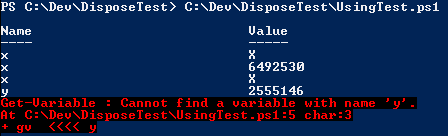
SharePoint Example
using Microsoft.SharePoint
using ($s = new-object Microsoft.SharePoint.SPSite('http://localhost/')) {
  $s.AllWebs | %{ using ($_) { $_ | select Title, Url } }
}
if($s -eq $null) { 'Success!' }
It’s not exceedingly friendly for interactive mode, particularly for tab completion, but it should aid script readability.


 Solutionizing .NET
December 27, 2008 at 10:51 pm
[…] Keith expands these techniques to flush out a more general purpose solution. […]
February 16, 2009 at 10:42 pm
[…] My Using Function […]
June 1, 2009 at 12:18 pm
thanks homey!!
-d
April 12, 2010 at 7:54 am
I am attempting to use your “Using” function with Powershell v2.0 and continually get an error with the following message:
“The ‘using’ keyword is not supported in this version of the language.”
I have put the “Using” function in my local profile; any ideas?
April 12, 2010 at 6:33 pm
I’ve meant to update this post for a while… PowerShell 2 added a number of reserved, but unimplemented, keywords, including
using. You will need to name the function something different, perhapsUse-Objectwith an alias ofuse?April 13, 2010 at 10:22 am
Thank you, worked great!
June 14, 2010 at 7:39 am
Also, in PowerShell 2.0 the Add-Type cmdlet has an -Assembly parameter set which is an implementation of Lee Holmes’ suggestion for resolving assemblies with a map instead of using LoadWithPartialName, so you could try falling back to that before using the deprecated LoadWithPartialName.